Intelligent Message Filter: Architecture, SCL, and AI Defenses

Email security has transformed dramatically over the past two decades. In the early days of corporate mail infrastructure, standard firewalls and simple keyword blocks struggled to handle the sudden explosion of junk mail. Microsoft responded by introducing the intelligent message filter to help administrators automatically evaluate incoming data streams.
Understanding how message filtering technology has grown from early pattern recognition to machine learning models is essential for building a resilient enterprise posture. Modern organizations face far more dangerous vectors than simple bulk advertisements, requiring a shift from static boundary rules to adaptive, multi-layer filtering architecture.
What Was the Microsoft Intelligent Message Filter (IMF)?
Originally introduced for Microsoft Exchange Server 2003 and expanded in Exchange Server 2007 and 2010, the intelligent message filter was an integrated defense engine built directly into the SMTP pipeline and mail flow. Rather than forcing administrators to manually compile lists of banned phrases, it processed the body and headers of incoming transmissions using machine learning algorithms trained on SmartScreen technology.
Operating inside the transport layer, the filter evaluated incoming internet mail after connection, sender, and recipient filters had run their initial checks. By assigning probability values based on structural patterns, language characteristics, and message formatting, it gave administrators predictable control over what entered the corporate network.
How the Filter Worked: Decoding the Spam Confidence Level (SCL) Mechanism
At the core of the engine was the Spam Confidence Level, commonly referred to as SCL. Once the intelligent message filter analyzed a message, it stamped an SCL rating from 0 to 9 directly into the message properties.
Lower ratings represented legitimate correspondence, while higher ratings indicated a strong probability of unsolicited junk:
-
SCL 0 to 2: Safe mail delivered directly to the user Inbox.
-
SCL 3 to 4: Borderline mail that warranted caution banners or deeper scanning.
-
SCL 5 to 6: Suspected junk routed to the Junk Email folder or held for administrative review.
-
SCL 7 to 9: Obvious spam marked for immediate deletion or quarantine.
Administrators typically configured two separate operational thresholds. The gateway threshold suppressed or rejected obvious spam at the edge before delivery consumed server bandwidth. The store threshold evaluated borderline messages inside the mailbox database, routing them to the Junk Email folder instead of the user Inbox.
Crucially, Exchange also incorporated a parallel Phishing Confidence Level (PCL). While SCL focused on bulk commercial text patterns, PCL evaluated deceptive elements, such as mismatched link targets and suspicious header inconsistencies, adding another layer of defense to the mail flow.
Why Static Content Filtering Failed Against Modern Attack Vectors
The legacy approach achieved strong results against early 2000s bulk campaigns, but threat actors adapted quickly. Static heuristic analysis and pattern recognition rules rely on historical signatures, which quickly proved inadequate against sophisticated threats.
Modern cyberattacks rarely announce themselves with predictable text keywords. Threat actors execute targeted Business Email Compromise (BEC), executive impersonation, and zero-day phishing through plain, clean conversational language that easily clears traditional content thresholds.
Furthermore, attacks shifted from payload-heavy files to dynamic links. A weaponized URL often points to a benign landing page during the initial scan, only redirecting to a malicious credential-harvesting portal after the message sits safely inside the recipient inbox. Legacy on-premises transport agents evaluating mail at the boundary could not defend against time-of-click evasion techniques.
Intelligent Message Filter vs Conventional Filters: An Architectural Comparison
To understand why email infrastructure changed, compare rule-based systems, legacy heuristic filtering, and modern AI-driven platforms:
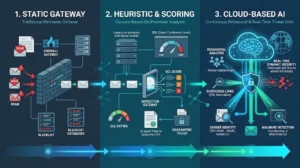
| Feature Category | Conventional Filters | Legacy IMF Approach | Modern AI & Cloud Security |
| Detection Method | Static blacklists, regex, manual rules | Machine learning via SmartScreen, static SCL | Natural language processing (NLP), behavioral analysis |
| Evaluation Timing | Inbound connection time | Inbound SMTP pipeline scan | Continuous inspection and post-delivery detonation |
| Threat Focus | Known spam patterns and bad IP addresses | Bulk spam text and formatting anomalies | Identity theft, BEC, zero-day links, polymorphic malware |
| Adaptability | Manual updates by human administrators | Periodic database signature updates | Real-time threat detection and global telemetry feeds |
| Integration Scope | Gateway SMTP only | Standalone or on-premises Edge transport | Native cloud APIs across email, Teams, and Slack |
Conventional filters remain useful for eliminating known botnets and bad IP ranges, but relying solely on them creates blind spots. An intelligent message filter bridges basic connection filtering and advanced identity protection by evaluating contextual content patterns.
Core Technologies Powering Modern Intelligent Filtering Systems
Today, the principles behind the original intelligent message filter have expanded into sophisticated cloud engines capable of contextual analysis across multiple vectors.
Natural Language Processing and Behavioral Analysis
Modern security systems evaluate intent rather than simple keyword matches. Using natural language processing, advanced filters parse the tone and relationship dynamics of an email. If an external message requests an urgent wire transfer, asks to update employee banking details, or mimics executive correspondence, the system detects anomalous language patterns regardless of whether the email contains suspicious attachments.
Behavioral analysis tracks communication graphs over time. The platform learns who normally speaks with whom, standard sending hours, and historical geographical locations, allowing it to flag unusual deviations instantly.
Dynamic Sandboxing and Real-Time Threat Intelligence
Modern platforms do not treat messages as static snapshots. Safe Links and dynamic sandboxing inspect embedded links at the moment a user clicks them, defending against deferred URL redirects. Incoming attachments are detonated in isolated cloud environments to monitor memory behavior, neutralizing polymorphic malware before it executes on a corporate endpoint.

The Pre-Filter Triad:
Content analysis is only effective when paired with strong cryptographic identity verification. Before an advanced engine inspects message text, strict authentication protocols must establish sender legitimacy:
-
Sender Policy Framework (SPF): Publishes the authorized IP addresses allowed to send mail on behalf of a domain.
-
DomainKeys Identified Mail (DKIM): Attaches a cryptographic signature to message headers, verifying that content was not altered in transit.
-
Domain-based Message Authentication, Reporting, and Conformance (DMARC): Enforces explicit policy actions when SPF or DKIM checks fail, instructing mail servers to quarantine or reject spoofed domains.
-
Authenticated Received Chain (ARC): Preserves original authentication results across intermediate relays, preventing false rejections caused by mailing lists and forwarding services.
Enforcing these standards ensures that illegitimate senders cannot easily impersonate internal executives, allowing content-inspection engines to focus their computational power on genuine anomalies.
Replacing Legacy IMF:
Organizations still operating legacy on-premises Exchange servers must move away from obsolete filtering models. Today, Microsoft environments rely on Exchange Online Protection (EOP) alongside Microsoft Defender for Office 365, fully superseding what the intelligent message filter once accomplished.
EOP delivers dependable baseline protection against bulk spam, known malware, and transport-level threats. Defender builds on that foundation by providing time-of-click URL inspection, attachment detonation, anti-impersonation rules, and automated threat investigation playbooks.
When planning a migration, avoid trying to replicate old numeric thresholds directly. Instead of mapping an arbitrary SCL figure to modern cloud policies, focus on business outcomes. Use Microsoft preset security policies as an initial baseline, monitor false positive rates, and adjust quarantine notifications to provide clean visibility for security analysts.
Advanced Evasion Tactics and Modern Defenses
Modern cybercriminals construct elaborate evasion methods designed to deceive content analysis tools. A widespread technique involves homoglyphs and hidden Unicode, where attackers replace Latin characters with identical-looking Cyrillic glyphs or inject zero-point font code to confuse signature scanners while displaying clean text to the human eye.
Modern security engines defeat these obfuscations through automated text normalization and structural decoding. By rendering text visually and normalizing raw strings prior to model evaluation, contemporary systems accurately categorize deceptive messages that bypassed older filters.
Furthermore, protection must extend beyond standard email boundaries. Enterprise workforces depend heavily on instant messaging tools, making it necessary to deploy intelligent filtering across Microsoft Teams, Slack, and collaboration channels to prevent cross-platform phishing.

Practical Best Practices for Email Administrators
Securing enterprise messaging requires ongoing balance between tight protection and smooth business communication. Implementing an intelligent message filter strategy works best when combined with structured administrative habits:
-
Audit Inbound Connectors Regularly: Document every external mail source and eliminate legacy relay rules that bypass spam evaluation.
-
Avoid Excessive Whitelisting: Bypassing spam checks for broad sender domains introduces major risk. Rely on authenticated domain validation rather than blanket IP allow-lists.
-
Maintain Low False Positive Rates: Aim to keep legitimate mail delivery errors below 0.1 percent. Regularly inspect quarantine reports to identify misclassified vendor correspondence.
-
Educate End Users: Train employees to report suspicious messages directly through integrated client tools. User reporting feeds active threat loops and strengthens system accuracy.
The Continuing Evolution of Message Filtering
The concept of the intelligent message filter has traveled a long path from its roots in Exchange Server 2003. What began as a local transport agent assigning simple numerical scores to raw SMTP packets has transformed into a resilient ecosystem of cloud-native machine learning models, identity frameworks, and behavioral safeguards.
By combining strict domain authentication with automated content inspection, IT teams can establish proactive protection against sophisticated social engineering threats. As digital communications continue to expand across email, chat, and cloud collaboration workspaces, maintaining an adaptive intelligent message filter strategy remains a vital pillar of modern enterprise cybersecurity.







Post Comment